Computer Network
A communication system in which many devices(hosts/nodes) is talking to each other. Devices like mobile, smart fridge, CCTV camera, car, industrial machines.
Why ?
- Better connectivity - All devices will be linked
- Resource sharing - cloud storage, computing power
- Better communication - video calls, emails, social media
- People Bring Together - Social media, communication aj ka pura internet “network of networks” hai. Chhote-chhote LANs milke bada WAN banate hain.
Types of Computer Networks
| Feature | LAN (Local Area Network) | WAN (Wide Area Network) |
|---|---|---|
| Area Covered | Small – one room, building, or campus | Large – cities, countries, or continents |
| Speed | Very fast (1 Gbps, up to 10/40/100 Gbps) | Slower than LAN |
| Cost | Low long-term cost | Higher recurring ISP cost |
| Technology | Ethernet | Leased lines, Fiber, Internet |
| Ownership | Private organization | ISP / Telecom provider |
| Example | Home, Office, College Lab | Internet |
Key Difference: You have the ownership of LAN can control it fully, but not of WAN
Data Communication over a Network
Imagine nodes A (sender) to H (receiver) tak, beech mein routers B,C,D,E,F,G.
- Circuit Switching - dedicated path of communication is established in starting only between A and H.
How it Works?
- Connection Establishment (Phase 1): Path fix aur reserve (dedicated logical channels). Initial delay hota hai.
- Data Transfer (Phase 2): Max possible speed, guaranteed bandwidth, no interruption.
- Connection Termination (Phase 3): Resources release - dusre users use kar sakein.
Advantages:
- Perfect for Continuous flow like voice.
- Predictable, reliable performance.
Disadvantages:
- Computer data bursty hota hai - kabhi bohot data, kabhi zero. Channel reserved rehta hai → low utilization, waste of resources.
- Initial delay always
- Not good for modern internet (data traffic)
- Packet Switching (My Fav) - Message is broken into short packets (~kbytes)
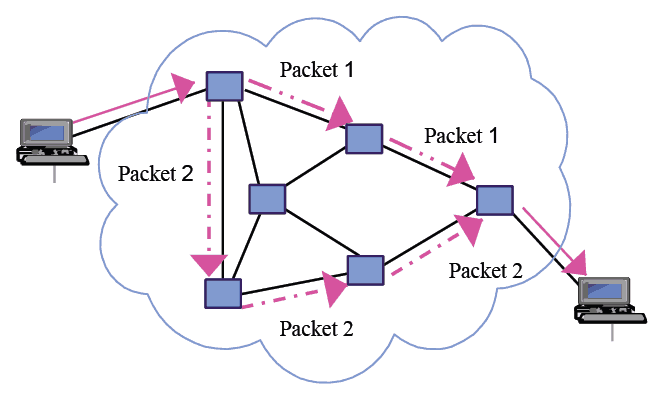
Steps:
- Longer message broken up into smaller chunks
- Har packet mein header add (destination address, sequence, etc.).
- Packets alag-alag bhej do. As they are independent and knows where to go
Store-and-Forward (Sabse Important Concept)::
- Router (Intermediate route) packet receive karta hai → apne buffer (temporary memory) mein store karta hai.
- Routing table dekhta hai → decide karta hai next link konsa.
- Phir forward karta hai.
- Agar next link busy → buffer mein wait.
- Fayda: Link utilization badhta hai, data rate conversion possible (fast incoming → slow outgoing), priority de sakte ho.
Advantages:
- Links can be shared; utlisation = better
- Suitable for computer generated busted traffic
- Flexible - congestion ho toh alternate route.
- Buffering + priority easy.
Disadvantage of Packet Switching
- Unordered Delays: Packets may arrive out of sequence, while circuit switching ensures ordered delivery since all data follows the same path.
- Need of Sequence Number: To reassemble data correctly, each packet must carry a sequence number.
- Increased Complexity: Each node must be capable of routing packets dynamically, which adds to the complexity.
- Rerouting and queuing can introduce delays, especially under high network load.
- While ideal for small or burst data, packet switching can be less efficient for large, constant data transmissions compared to circuit switching.
Garvit Hacking Angle: Yeh samajh ke tu packet sniffing, fragmentation attacks, routing manipulation kar sakta hai.
Packing Switching Approches
a. Virtual Circuit = Packet Switching + Circuit Switching jaisa behaviour
- Circuit switching jaisa lekin packets ke liye.
- Pehle route establish karo (connection phase).
- Sab packets same fixed path follow karenge.
- Har circuit ko [[Virtual Circuit Number (VC#)]] milta hai.
- Header mein sirf VC# hota hai → routers uske hisaab se forward (no need full address every time).
- Har router apne routing table mein VC# → next link store karke rakhta ha
- Store-and-forward toh hota hi hai.
- No dynamic routing per packet - path fixed rehta hai.
Drawback:
- Link slow ho jaaye tab bhi same path use karte raho - not adaptive.
Example:
Tu A se H tak data bhej raha hai. Virtual Circuit bana diya → path A→B→E→H. Ab saare packets isi path pe jayenge, bhale hi beech mein traffic ho. Agar koi link slow ho gaya toh bhi wohi path use hoga
| Pure Circuit Switching | Virtual Circuit (Packet Switching) | |
|---|---|---|
| Path | Dedicated physical/logical path | Fixed logical path (shared links) |
| Bandwidth | Guaranteed dedicated | No strict guarantee, shared |
| Packets | Continuous stream (no packets) | Small packets, same route |
| Connection Phase | Yes | Yes (route establish) |
| Dynamic Routing | No | No (fixed path once set) |
| Link Utilization | Poor (bursty data waste) | Better than circuit, but not best |