Week - 1
Review of MAD-I
What is an App?
Definition An application/program used for interacting with a computing system, allowing the user to perform tasks useful to them.
Core Components
| Component | Role |
|---|---|
| Backend | Stores data, processing logic, relationships between data elements |
| Frontend | User-facing views, abstracts machine interaction |
Naturally implies a client-server / request-response architecture
Why Web?
- Universal platform as almost every device have browser
- Low Barrier to entry: can make html pages in 2 minutes easy peasy lemon squeezy.
- High flexibility - can make simple to complex systems.
Web is "good enough" for 95% apps. Native apps (Android/iOS) sirf performance ya hardware access ke liye chahiye. Isliye full-stack web devs sabse zyada demand mein hain.
Review: Web Application Development Model
- Presentation: HTML (content structure) + CSS (styling).
- Logic: Backend mein Python + Flask (flexible).
- Application Architecture: MVC (Model-View-Controller) Good compromise between understandability and flexibility
- Model = Data
- View = UI
- Controller = Logic that is connecting
- System Architecture:
- REST principles + Sessions (stateless HTTP pe stateful apps kaise banaaye).
- APIs: Data ko view se alag rakhna.
- RESTful APIs – basic understanding ke liye accha, lekin strict REST mat follow kar hamesha (practicality first).
- Others: Security, Validation, Login + RBAC (Role Based Access Control), Database choices, Frontend choices.
Moving Forward
Advanced Frontend Development
- Exploring JavaScript in depth
- JAMStack: JavaScript + APIs + Markup
- VueJS as a candidate frontend framework
Other Topics of Interest
- Asynchronous messaging, Email
- Mobile/Standalone apps, PWA (Progressive Web Apps), SPA (Single Page Apps)
- Performance measurement, benchmarking, optimization
- REST alternatives (GraphQL etc.)
Javascript
Origins
- Created in 1995 as a scripting language for Netscape Navigator
- Intended as a “glue” language
- Meant to stick modules from other languages together
- Not designed for large codebases
- Primarily meant to assist Java “applets” → hence the name JavaScript
- Trademark issues led to name changes
- Early issues: Issues: Slow + Limited.
Master Tip: History samajh lo toh weird bugs samajh aayenge.
Power (The Turning Point)
- The “glue” was useful, but real power emerged ~2005 with:
- Google Maps, Google Suggest
- Enabled fluid UI: pan/zoom on maps, load only what’s needed.
- Named Ajax (Asynchronous JavaScript and XML) by Garrett, 2005
- As a result “web applications” behaving like desktop apps
Standardisation
- Netscape ke bahar nikalne ke liye ECMA (European Computer Manufacturers Association) standard 262 banaya.
- Official naam ECMAScript (Java trademark avoid karne ke liye).
- In practice: Language standard = ECMAScript versions, Implementation = JavaScript.
- ES6 (2015) mein bada change aaya – modules, classes, arrow functions, etc.
- Ab yearly releases + “feature readiness” approach.
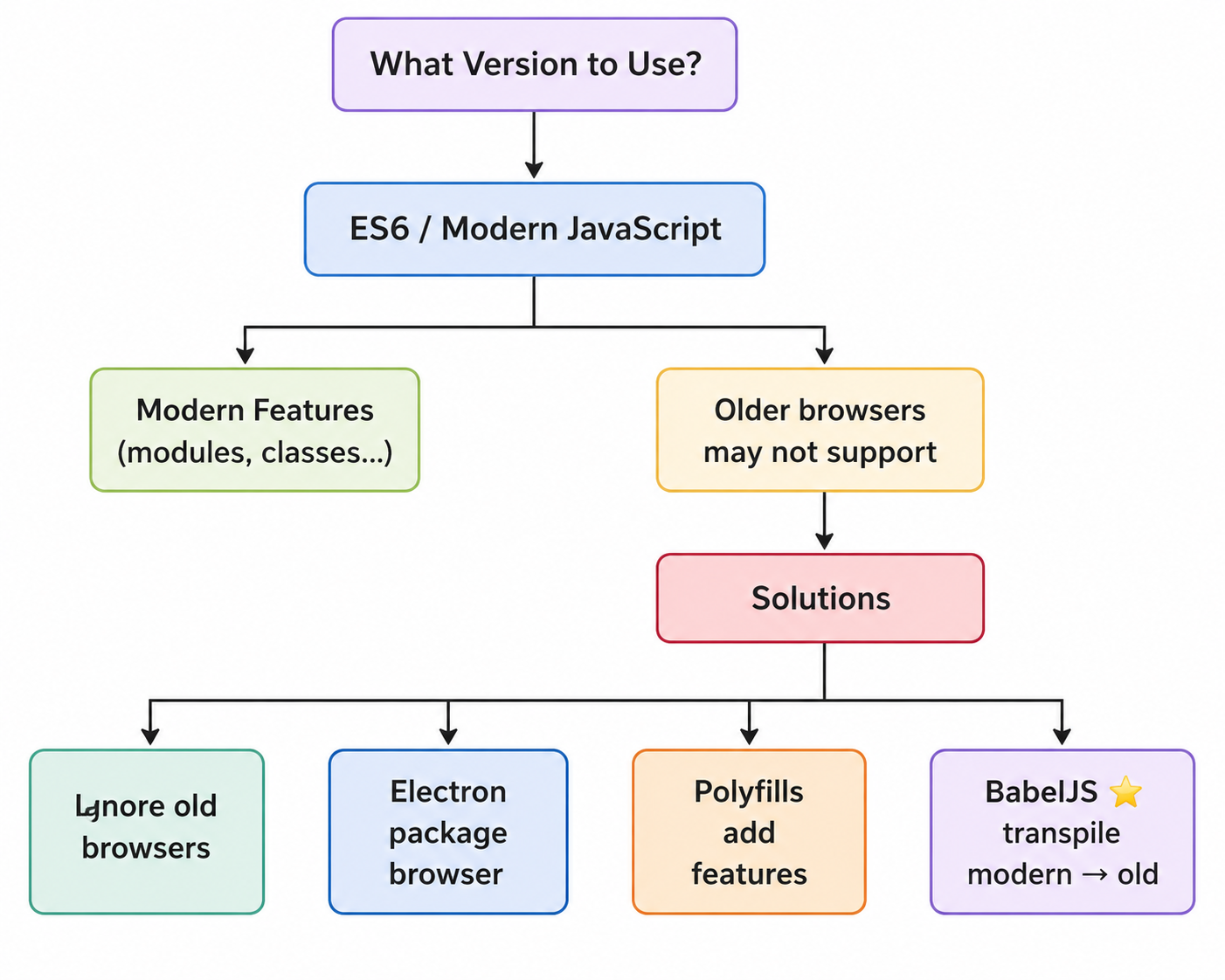
Ignore old browsers +ask user to upgrade
Implications of JS
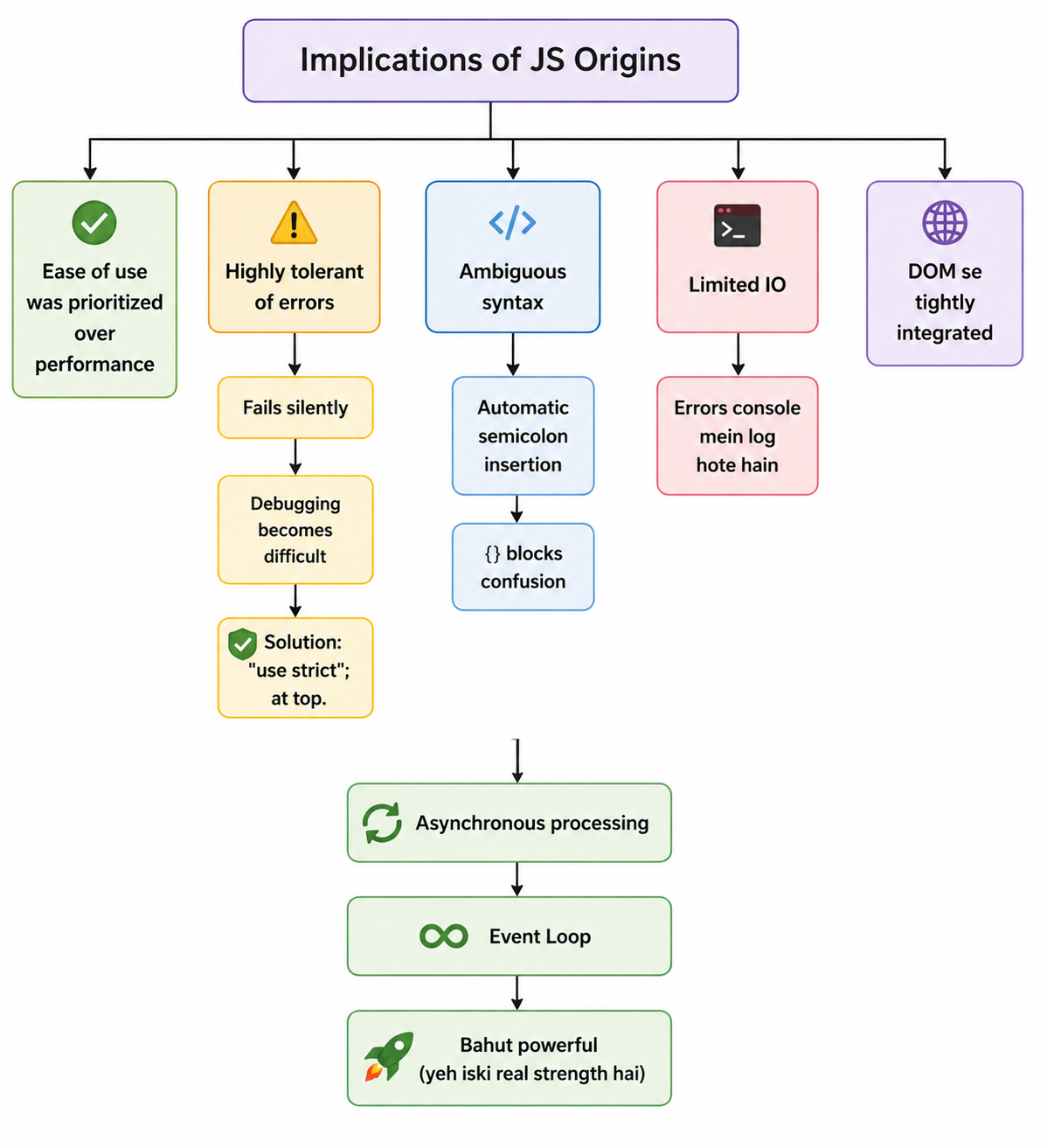
Using JS
- originally made for command line scripting
- Need HTML file to load the JS as a script
- can run in terminal via node js tho
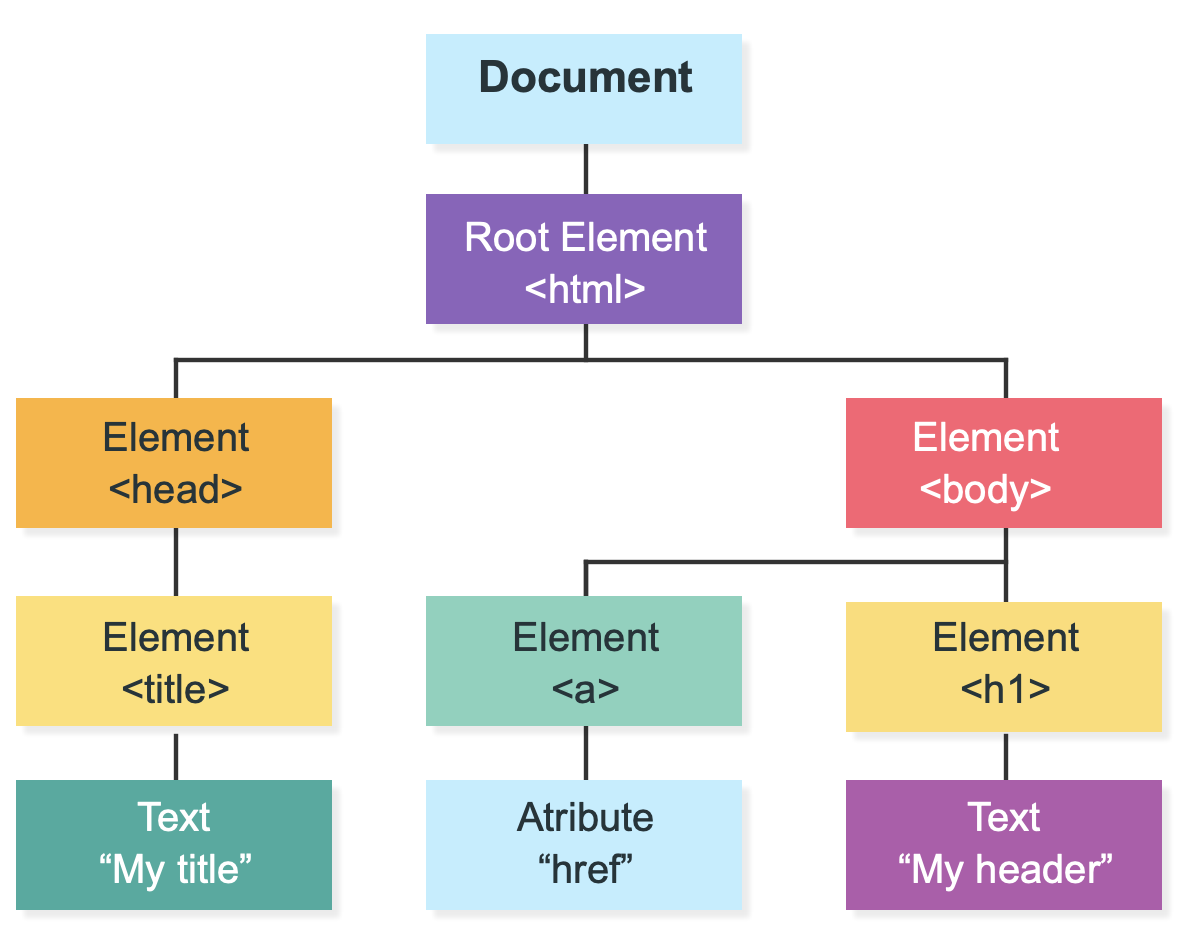
DOM (Document Object Model)
- Browser mein page ka structure (tree form mein).
- JS can manipulate this, thats why its powerful
- Input: clicks, typing, mouse hover.
- Output: text change, colors, drawing (canvas), animations.
References & Utilities
Best Resources:
- JavaScript for impatient programmers (exploringjs.com) – language focused, up-to-date.
- MDN (Mozilla Developer Network) – official docs, best examples.
- Learn JavaScript Online (interactive).
JavaScript Syntax
Basic Structure
- Loosely structured language
- No strict header/body like C/Java
Comments
// Single line comment

/*
Multi-line comment
*/
Use comments to make your code neat and clean (Control F krke find the stuff).
Identifiers Reserved Words:
Identifier
Koi bhi naam jo hum variable, function ya cheez ko deta hai.
Rules:
- Letters, numbers, _ and $ can be used
- Can’t start with number
- Spaces are not allowed
never use as variable names
await break case catch class const continue debugger default delete do else export extends finally for function if import in instanceof let new return static super switch this throw try typeof var void while with yieldLiteral
direct value that we give in code
Examples of Literals:
- 5 → number literal
- “Garvit” → string literal
- true → boolean literal
- null → null literal
Statements vs Expressions
Easy Definition
- Statement → A complete instruction that performs an action. (Ek poora instruction jo kuch kare. Jaise order dena.)
- Expression → Anything that produces a value.(Koi cheez jo value banake de.)
Real-Life Analogy
| Concept | Think of it as… |
|---|---|
| Statement | Giving an order 📢 |
| Expression | Calculating an answer 🧮 |
Examples
let x = 10 + 5;10 + 5→ Expression (evaluates to15)let x = 10 + 5;→ Statement (declares a variable)
Another Example
console.log("Hello");console.log("Hello");→ Statement"Hello"→ Expression (a string value)
Quick Trick
Expression = Gives a value
Statement = Does something
Quick Comparison
| Statement | Expression |
|---|---|
| Performs an action | Produces a value |
Usually ends with ; | Can be part of a statement |
| Cannot always be assigned | Can be assigned to a variable |
Example: if, for, let, console.log() | Example: 5 + 3, "Hi", x * 2, true |
Common Mistake
If you use an expression where JavaScript expects a statement, or vice versa, you’ll get a syntax error or unexpected behavior.
Remember
Every expression has a value.
Every statement performs an action.
A statement may contain one or more expressions.
Data Types (What Can JavaScript Store?)
Definition
Data Types define the kind of value a variable can store.
🧱Primitive Data Types
Primitive types are the basic building blocks of JavaScript.
| Type | Meaning | Example |
|---|---|---|
number | Numbers (integers & decimals) | 42, 3.14 |
string | Text | "Garvit", 'Hello' |
boolean | True or False | true, false |
undefined | Variable declared but no value assigned | undefined |
null | Intentionally empty value | null |
💻 Examples
let age = 20;               // number
let name = "Garvit";        // string
let isStudent = true;       // boolean
let score;                  // undefined
let user = null;            // null
Important
Primitive values are immutable.
Once created, their value cannot be changed directly.
📦 Objects (Reference Types)
Objects are used for storing collections of data and more complex entities.
Examples include: Arrays, Objects, Functions, Dates, Maps, Sets
let person = {
    name: "Garvit",
    age: 20
};

let fruits = ["Apple", "Banana", "Mango"];

function greet() {
    console.log("Hello!");
}
Master Point
Almost everything in JavaScript can behave like an object (except primitive values).
This is one of the reasons JavaScript is so flexible.
📝 Strings (Text)
Strings store textual data.
Creating Strings
let name = "Garvit";      // Double quotes
let city = 'Mumbai';      // Single quotes
Both single (' ') and double (" ") quotes work the same.
⭐Template Literals (Recommended)
Template literals use backticks (`).
let name = "Garvit";

let message = `My name is ${name} and I am learning JavaScript.`;

console.log(message);
Why use Template Literals?
- Easier to read
- Supports variable interpolation using
${} - Supports multi-line strings
Pro Tip
Prefer backticks (
) whenever your string contains:
- Variables (
${})- Multiple lines
- Complex text formatting
Practice
let myName = "Garvit";      // Variable
const age = 20;             // Constant

console.log("My name is " + myName);

console.log(`I am ${age} years old.`);
Output
My name is Garvit
I am 20 years old.
Quick Cheat Sheet
| Data Type | Example |
|---|---|
| Number | 10, 3.14 |
| String | "Hello" |
| Boolean | true |
| Undefined | let x; |
| Null | null |
| Object | {} |
| Array | [] |
| Function | function(){} |
Remember
- Primitive Types → Store single values.
- Objects → Store collections and complex data.
- Strings → Use backticks (
) for interpolation and multiline text.- Template Literals are the modern and recommended way to build strings.
Control Flow (Controlling the Flow of Your Code)
Info
Control Flow decides which code runs, when it runs, and how many times it runs.
1. Conditional Execution(Decision Making)
Use conditions to execute different blocks of code.
Syntax
if (condition) {
    // Runs if condition is true
} else if (anotherCondition) {
    // Runs if this condition is true
} else {
    // Runs if none of the above are true
}
Example
let age = 18;

if (age >= 18) {
    console.log("You can vote!");
} else {
    console.log("You are too young.");
}
Comparison Operators
| Operator | Meaning |
|---|---|
> | Greater than |
< | Less than |
>= | Greater than or equal |
<= | Less than or equal |
=== | Strict equality |
!== | Strict inequality |
2. Iteration (Loops)
Info
Loops allow you to execute the same block of code multiple times.
For Loop
Best when you know the number of iterations.
for (let i = 0; i < 5; i++) {
    console.log("Count:", i);
}
While Loop
Best when the number of iterations is unknown.
let count = 0;

while (count < 5) {
    console.log("While count:", count);
    count++;
}
Modern JavaScript
Prefer these when possible:
for...of.forEach()They are cleaner and easier to read.
3. Changing Loop Flow
| Keyword | Purpose |
|---|---|
break | Exit the loop immediately |
continue | Skip the current iteration |
Example
for (let i = 1; i <= 5; i++) {

    if (i === 3) continue;

    if (i === 5) break;

    console.log(i);
}
Output
1
2
4
4. Switch Statement
Useful when checking multiple possible values.
let day = "Monday";

switch (day) {

    case "Monday":
        console.log("Start of week");
        break;

    case "Friday":
        console.log("Almost weekend!");
        break;

    default:
        console.log("Normal day");
}
Warning
Don’t forget
break.Without it, JavaScript continues executing the next case (fall-through).
Functions (Reusable Blocks of Code)
Info
A function is a reusable block of code that performs a specific task.
Basic Function
function add(x, y) {
    return x + y;
}

console.log(add(5, 3));
Output
8
Ways to Create Functions
1. Function Declaration
function add(x, y) {
    return x + y;
}
2. Function Expression
let add = function (x, y) {
    return x + y;
};
3. Arrow Function (Recommended)
const add = (x, y) => x + y;Important
Functions are first-class objects in JavaScript.
This means they can:
- Be stored in variables
- Be passed as arguments
- Be returned from other functions
- Have properties and methods
Anonymous Functions
Functions without a name.
let sayHello = function () {
    console.log("Hello");
};

sayHello();
IIFE (Immediately Invoked Function Expression)
Runs immediately after being created.
(function () {
    console.log("This runs immediately!");
})();
Warning
IIFEs were common before ES6.
Modern JavaScript rarely needs them because:
- Modules
- Block scope (
let/const)- Arrow functions
solve most of the same problems.
DOM API (Document Object Model)
Info
The DOM represents an HTML page as a tree of objects.
JavaScript uses the DOM to interact with web pages.
HTML
<button id="myBtn">Click Me!</button>JavaScript
document
    .getElementById("myBtn")
    .addEventListener("click", function () {

        alert("Button clicked!");

    });
Common DOM Operations
| Input | Output |
|---|---|
| Mouse Click | Change text |
| Keyboard Input | Change color |
| Mouse Move | Add elements |
| Form Submit | Remove elements |
Tip
Use
console.log()frequently while learning.It helps you:
- Inspect variables
- Debug code
- Understand program flow
Quick Cheat Sheet
| Topic | Purpose | |
|---|---|---|
if...else | Decision making | |
switch | Multiple choices | |
for | Fixed number of iterations | |
while | Unknown number of iterations | |
break | Exit loop | |
continue | Skip current iteration | |
| Function | Reusable code | |
| Arrow Function | Modern function syntax | |
| Anonymous Function | Function without a name | |
| IIFE | Runs immediately | |
| DOM | Interact with web pages |
Success
- Control Flow decides what runs.
- Loops repeat code.
- Functions make code reusable.
- Arrow Functions are the modern standard.
- DOM lets JavaScript interact with HTML and respond to user actions.