Vue.js
Info
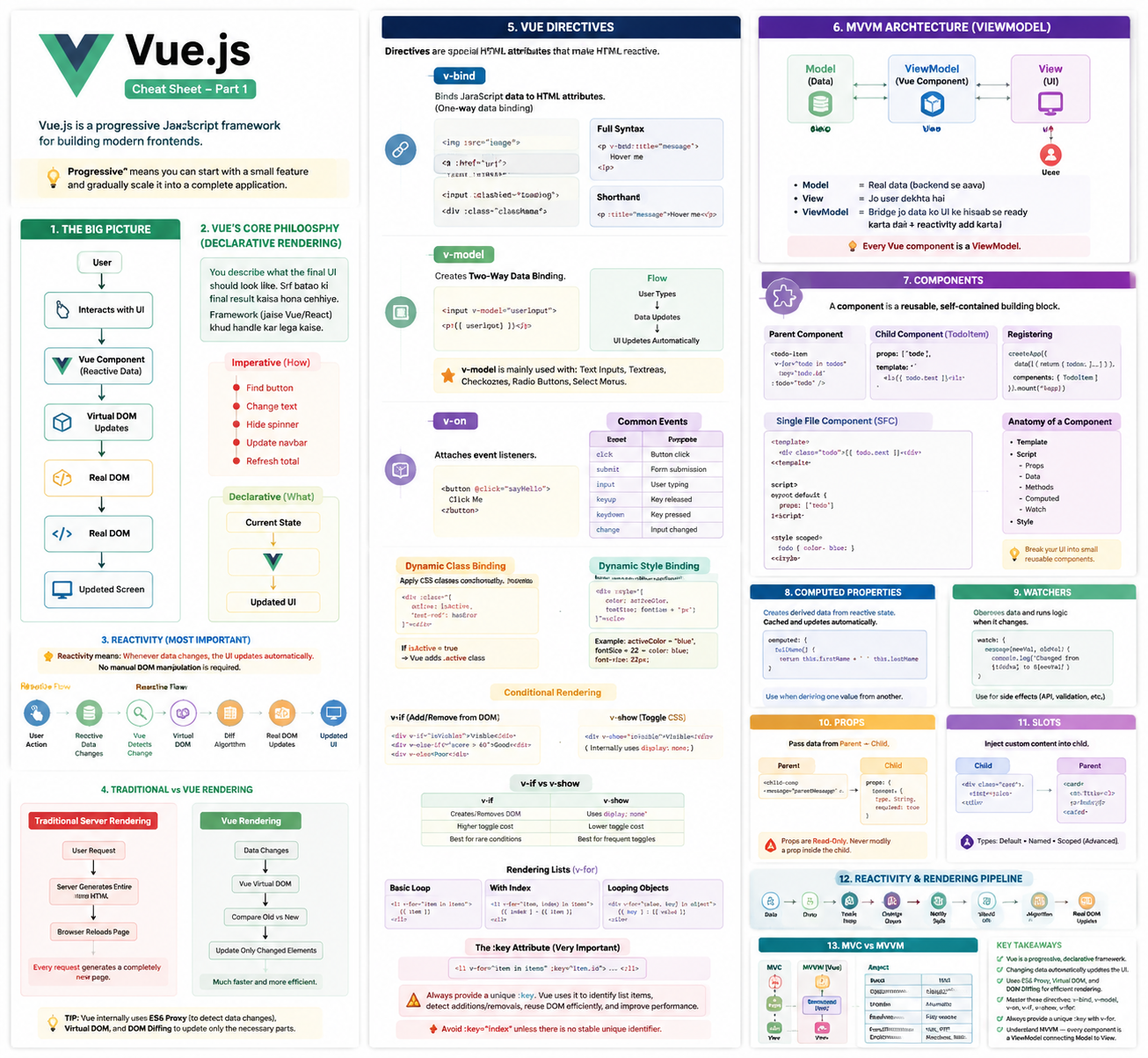
Vue.js is a progressive JavaScript framework for building modern frontends.
“Progressive” means you can start with a small feature and gradually scale it into a complete application.
The Big Picture
             User
               │
               ▼
      Interacts with UI
               │
               ▼
        Vue Component
        (Reactive Data)
               │
               ▼
      Virtual DOM Updates
               │
               ▼
          Real DOM
               │
               ▼
        Updated Screen
Vue’s Core Philosophy
Vue follows Declarative Rendering.
Info
You describe what the final UI should look like. Sirf batao ki final result kaisa hona chahiye Framework (jaise Vue/React) khud handle kar lega kaise Instead of telling JavaScript how to update the page…
Find button
    ↓
Change text
    ↓
Hide spinner
    ↓
Update navbar
    ↓
Refresh total
…you simply describe what the UI should look like.
Current State
      │
      ▼
     Vue
      │
      ▼
Updated UI
Important
Imperative Programming
Tell JavaScript how to update everything.
Declarative Programming
Tell Vue what the UI should look like.
Reactivity (Most Important Concept)
Important
Reactivity means:
Whenever data changes, the UI updates automatically.
No manual DOM manipulation is required.
Reactive Flow
User Action
      │
      ▼
Reactive Data Changes
      │
      ▼
Vue Detects Change
      │
      ▼
Virtual DOM
      │
      ▼
Diff Algorithm
      │
      ▼
Real DOM Updates
      │
      ▼
Updated UI
Why Reactivity Matters
Real applications constantly change.
Examples:
- User logs in
- Shopping cart updates
- Notification count changes
- Dark mode toggles
- Profile picture changes
- Messages arrive
- Theme changes
Without reactivity:
Update Navbar
Update User Name
Update Cart
Update Dashboard
Update Notifications
Update Theme
Everything must be updated manually.
With Vue:
this.isLoggedIn = true;Vue automatically updates every part of the UI that depends on that data.
Real-Life Example
Shopping Cart
User clicks "Add to Cart"

↓

cart.push(product)

↓

Cart count updates
Total price updates
Checkout page updates
Navbar updates
Only one piece of data changed.
Vue handled the rest.
Traditional Rendering vs Vue
Traditional Server Rendering
User Request
      │
      ▼
Server Generates Entire HTML
      │
      ▼
Browser Reloads Page
Every request generates a completely new page.
Vue Rendering
Data Changes
      │
      ▼
Vue Virtual DOM
      │
      ▼
Compare Old vs New
      │
      ▼
Update Only Changed Elements
Much faster and more efficient.
Tip
Vue internally uses:
- ES6 Proxy (to detect data changes)
- Virtual DOM
- DOM Diffing
This allows Vue to update only the necessary parts of the page.
Vue Directives
Info
Directives are special HTML attributes that make HTML reactive.
v-bind
Binds JavaScript data to HTML attributes.(One-way data binding)
JavaScript ke data (variables) ko HTML attributes/elements pe bind kar deta hai. Jab JS mein value change hoti hai, UI automatically update ho jaati hai.
Full Syntax
<p v-bind:title="message">
    Hover me
</p>
Shorthand
<p :title="message">
    Hover me
</p>
Common Uses
<img :src="image">

<a :href="url">

<input :disabled="loading">

<div :class="className">
v-model
Creates Two-Way Data Binding.
Matlab ek taraf se data UI mein dikhega aur dusri taraf se UI change karoge toh data bhi automatically update ho jayega.
<input v-model="userInput">

<p>{{ userInput }}</p>
Flow
User Types
      │
      ▼
Data Updates
      │
      ▼
UI Updates Automatically
Important
v-modelis mainly used with:
- Text Inputs
- Textareas
- Checkboxes
- Radio Buttons
- Select Menus
It is one of Vue’s most frequently used directives.
v-on
Attaches event listeners.
Jaise click, input, submit, mouseover, keyup wagairah sab catch karta hai.
Full Syntax
<button v-on:click="sayHello">

    Click Me

</button>
Shorthand
<button @click="sayHello">

    Click Me

</button>
Common Events
| Event | Purpose |
|---|---|
click | Button click |
submit | Form submission |
input | User typing |
keyup | Key released |
keydown | Key pressed |
change | Input changed |
Dynamic Class Binding
Apply CSS classes conditionally.
<div
    :class="{
        active: isActive,
        'text-red': hasError
    }"
>
</div>
If
isActive = trueVue automatically adds
.activeDynamic Style Binding
<div
    :style="{
        color: activeColor,
        fontSize: fontSize + 'px'
    }"
>
</div>
Example
activeColor = "blue";
fontSize = 22;
Result
color: blue;
font-size: 22px;
Conditional Rendering
v-if
Creates or removes elements from the DOM.
<div v-if="isVisible">

    Visible

</div>
Supports
<div v-else-if="score > 60">

</div>

<div v-else>

</div>
v-show
Only changes CSS.
<div v-show="isVisible">

    Visible

</div>
Internally
display: none;v-if vs v-show
v-if | v-show |
|---|---|
| Creates/Removes DOM | Uses display: none |
| Higher toggle cost | Lower toggle cost |
| Best for rare conditions | Best for frequent toggles |
Rendering Lists (v-for)
Basic Loop
<li v-for="item in items">

    {{ item }}

</li>
With Index
<li
    v-for="(item, index) in items"
>

    {{ index }} - {{ item }}

</li>
Looping Objects
<div
    v-for="(value, key) in object"
>

    {{ key }} : {{ value }}

</div>
The :key Attribute (Very Important)
<li
    v-for="item in items"
    :key="item.id"
>
Warning
Always provide a unique
:key.Vue uses it to:
- Identify list items
- Detect additions/removals
- Reuse DOM efficiently
- Improve rendering performance
Avoid
:key="index"unless there is no stable unique identifier.
MVVM Architecture (ViewModel)
Vue follows the Model–View–ViewModel architecture.
             User
               │
               ▼
          View (UI)
               ▲
               │
    ViewModel (Vue Component)
               ▲
               │
Model (Data)- Model = Real data (backend se aaya)
- View = Jo user dekhta hai
- ViewModel = Bridge jo data ko UI ke hisaab se ready karta hai + reactivity add karta hai
Model
Contains real application data. Examples
- Users
- Products
- Orders
- Database records
- API responses
View
Everything displayed to the user.
Examples
- Buttons
- Tables
- Forms
- Cards
- Images
- Navigation
ViewModel
Acts as the intelligent bridge between Model and View.
Responsibilities
- Stores reactive data
- Handles UI logic
- Computes derived values
- Synchronizes data and UI
- Responds to user actions
Every Vue component is a ViewModel.
Example
Registration Form
Username
Password
Confirm Password
Backend Model
Username
Password
ViewModel
Username
Password
Confirm Password
Passwords Match?
Validation Errors
confirmPassword exists only to improve the UI.
It is not stored in the database.
Complete Vue Rendering Pipeline
User Action
      │
      ▼
Reactive Data Changes
      │
      ▼
Vue Reactivity System
      │
      ▼
Virtual DOM
      │
      ▼
Diff Algorithm
      │
      ▼
Update Real DOM
      │
      ▼
Updated UI
Most Important Directives
| Directive | Purpose | Shorthand |
|---|---|---|
v-bind | Bind HTML attributes | : |
v-model | Two-way binding | — |
v-on | Event handling | @ |
v-if | Add/Remove elements | — |
v-else-if | Additional condition | — |
v-else | Default condition | — |
v-show | Toggle visibility | — |
v-for | Render lists | — |
Cheat Sheet
| Concept | Description |
|---|---|
| Vue | Progressive frontend framework |
| Declarative Rendering | Describe what the UI should be |
| Reactivity | UI updates automatically when data changes |
| Virtual DOM | Efficient rendering layer |
| Proxy | Detects data changes |
| DOM Diffing | Updates only changed elements |
v-bind | Bind HTML attributes |
v-model | Two-way binding |
v-on | Event handling |
v-if | Conditional rendering |
v-show | Toggle visibility |
v-for | Render collections |
:key | Unique identifier for list rendering |
| MVVM | Model → ViewModel → View |
Exam & Interview Takeaways
- Vue is a progressive and declarative JavaScript framework.
- Reactivity is Vue’s biggest feature—changing data automatically updates the UI.
- Vue internally uses ES6 Proxy, the Virtual DOM, and DOM Diffing for efficient rendering.
- Master these directives:
v-bindv-modelv-onv-ifv-showv-for- Always provide a unique
:keywithv-for.- Understand the MVVM architecture, as every Vue component acts as a ViewModel connecting data (Model) to the interface (View).
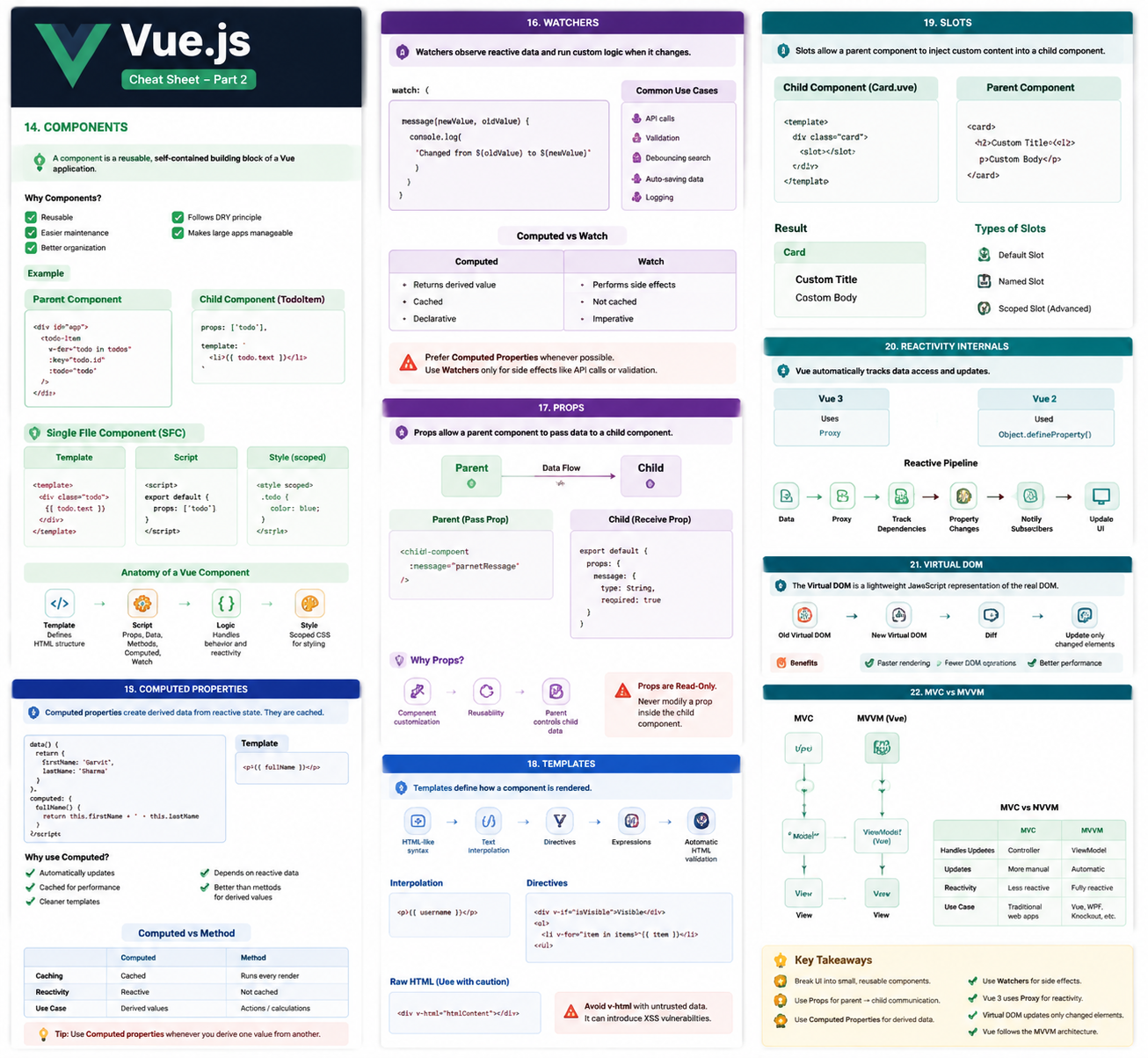
Components
Info
A Component is a reusable, self-contained building block of a Vue application.
Think of components like LEGO blocks—small independent pieces that combine to build large applications.
Why Components?
Benefits:
- Reusable
- Easier maintenance
- Better organization
- Follows the DRY (Don’t Repeat Yourself) principle
- Makes large applications manageable
Examples:
- Navbar
- Sidebar
- Product Card
- Todo Item
- Comment
- Login Form
Component Example
Parent Component
<div id="app">

    <todo-item
        v-for="todo in todos" <!-- har todo ke liye ek child banao -->
        :key="todo.id" <!-- unique key dena zaroori hai -->
        :todo="todo" <!-- child ko pura todo object bhej rahe ho -->
    />

</div>
Registering a Component
const TodoItem = {

    props: ["todo"], // Parent se jo data aaya usko accept kar raha ha

    template: `
        <li>{{ todo.text }}</li>
    `<!-- yahan todo ka text print ho raha hai -->

};

createApp({
    data() {
        return {
            todos: [...]
        };
    },
    components: {
        TodoItem
    }
}).mount("#app");
Single File Components (SFC)
Modern Vue applications use .vue files.
<template>
    <div class="todo">
        {{ todo.text }}

    </div>
</template>

<script>
export default {
    props: ["todo"]
}
</script>
<style scoped>

.todo {

    color: blue;

}

</style>
Anatomy of a Vue Component
Component
│
├── Template
├── Script
│     ├── Props
│     ├── Data
│     ├── Methods
│     ├── Computed
│     └── Watch
└── Style
Tip
Break your UI into small reusable components.
Smaller components are easier to:
- Understand
- Test
- Reuse
- Maintain
Computed Properties
Info
A Computed Property creates derived data from reactive state.
Unlike methods, computed properties are cached.
Example
data() {

    return {

        firstName: "Garvit",
        lastName: "Sharma"

    };

},

computed: {

    fullName() {
        return this.firstName + " " + this.lastName;
    }

}
Template
{{ fullName }}Why Use Computed Properties?
- Automatically updates
- Cached
- Faster than methods
- Cleaner templates
- Depends on reactive data
Computed vs Method
| Computed | Method |
|---|---|
| Cached | Runs every render |
| Reactive | Not cached |
| Best for derived values | Best for actions or calculations |
Important
Use Computed Properties whenever you derive one value from another.
Watchers
Info
A Watcher observes reactive data and runs custom logic whenever that data changes.
Watchers Vue.js mein ek feature hai jo kisi data property ko nazariye rakhta hai. Jab woh data change hota hai, tab automatically ek function chala deta hai (jaise bodyguard).
Example
watch: {

    message(newValue, oldValue) {

        console.log(
            `Changed from ${oldValue} to ${newValue}`
        );

    }

}
Common Use Cases
- API calls
- Validation
- Debouncing search
- Saving data automatically
- Logging
Computed vs Watch
| Computed | Watch |
|---|---|
| Returns derived value | Performs side effects |
| Cached | Not cached |
| Declarative | Imperative |
Warning
Prefer Computed Properties whenever possible.
Use Watchers only for side effects like API calls or validation.
Props
Info
Props allow a parent component to pass data to a child component.
Flow:
Parent
   │
   ▼
 Child
Parent
<child-component

    :message="parentMessage"

/>
Child
export default {

    props: {

        message: {

            type: String,
            required: true

        }

    }

}
Why Props?
- Component customization
- Reusability
- Parent controls child data
Warning
Props are Read-Only.
Never modify a prop inside the child component.
Templates
Info
Templates define how a component is rendered.
Features
- HTML-like syntax
- Text interpolation
- Directives
- Expressions
- Automatic HTML validation
Interpolation
{{ username }}Directives
v-if

v-for

v-bind

v-model

v-on
Raw HTML
<div v-html="htmlContent"></div>Warning
Avoid
v-htmlwith untrusted data.It can introduce Cross-Site Scripting (XSS) vulnerabilities.
Slots
Info
Slots allow a parent component to inject custom content into a child component.
Child
<template>

<div class="card">

    <slot></slot>

</div>

</template>
Parent
<card>

    <h2>Custom Title</h2>

    <p>Custom Body</p>

</card>
Result
Card
├── Custom Title
└── Custom Body
Types of Slots
- Default Slot
- Named Slot
- Scoped Slot (Advanced)
Reactivity Internals
Info
Vue automatically tracks data access and updates.
Vue 3
Uses
ProxyVue 2
Used
Object.defineProperty()Reactive Pipeline
Data
 │
 ▼
Proxy
 │
 ▼
Track Dependencies
 │
 ▼
Property Changes
 │
 ▼
Notify Subscribers
 │
 ▼
Virtual DOM
 │
 ▼
Diff Algorithm
 │
 ▼
Real DOM Updates
Virtual DOM
The Virtual DOM is a lightweight JavaScript representation of the real DOM.
Vue compares:
Old Virtual DOM
   ↓
New Virtual DOM
   ↓
Diff
   ↓
Update only changed elements
Benefits:
- Faster rendering
- Fewer DOM operations
- Better performance
MVC vs MVVM
MVC
User
  ↓
Controller
  ↓
Model
  ↓
View
Controller manages communication.
MVVM
Model

↓

ViewModel (Vue)

↓

View
ViewModel provides:
- Reactivity
- Data Binding
- UI Logic
MVC vs MVVM
| MVC | MVVM |
|---|---|
| Controller handles updates | ViewModel handles binding |
| More manual updates | Automatic updates |
| Less reactive | Fully reactive |
| Traditional web applications | Vue, WPF, Knockout |
Key Takeaways
- Components are reusable building blocks.
- Use Props for parent → child communication.
- Use Computed Properties for derived data.
- Use Watchers for side effects.
- Templates define how components render.
- Slots allow flexible content insertion.
- Vue 3 uses Proxy for reactivity.
- The Virtual DOM updates only changed elements.
- Vue follows the MVVM architecture.